Parents Sign-Off form Template is the document that is used by many educational sectors, such as daycare centers, in which they list the name of the student’s parents who attends the special activities held in the institutions. These sheets are not only used to enlist their names, but also, store their contact details and the children’s names who are enrolled in the school or higher school. So, if you’re in search of such a document, then you can use our basic parent’s sign-off form template that is presented in this post.
Imagine a busy school administrator or a dedicated coach rushing to finalize a field trip or a sports tournament, only to realize they are missing the critical documentation needed to ensure student safety and legal compliance. Whether you are organizing a classroom excursion or documenting a student’s milestone achievement, the need for a clear, formal acknowledgment is paramount to keep operations running smoothly. This is where a professionally designed Basic Parents Sign-Off Form Template becomes an invaluable asset, eliminating the stress of drafting documents from scratch. By utilizing a printable permission slip, educators can maintain a professional layout that ensures consistency and credibility across all school communications. These customizable forms allow you to easily create a parental consent form or a student authorization letter that looks polished and official. With a downloadable PDF or a simple sign-off sheet, you can secure a legal signature quickly, utilizing a standardized template to guarantee that every parental agreement is properly documented and archived for future reference.
Parents’ participation in the activities is very important because a child will know that his/her parents are serious about his future. Educational institutions held colorful events and invited the students’ parents to guide and support them. In that way, they need a useful sheet to enlist the attendees’ names and contact details in a proper manner. So, a sign-off form can help them out.
Free Basic Parents Sign-Off Form Template
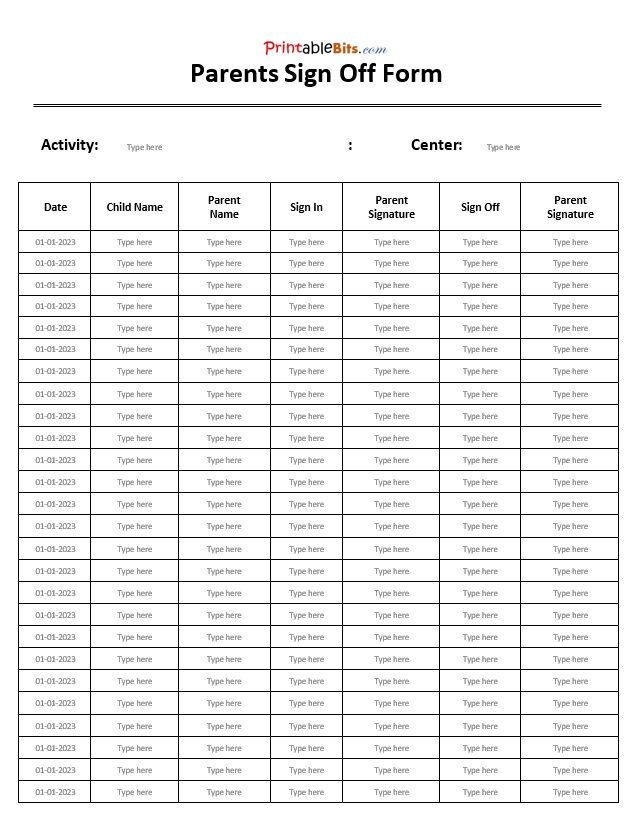
This basic parent sign-off sheet is suitable for both parents and legal guardians of children, such as for educational institutions. The form, however, presents the proper layout for putting details of the parents or guidance, including activity name, center, date, child name, parent name, sign-in/out time, and parent signatures. More about it, it can be modified as per the user’s preferences in MS Word file format. So without wasting more time, grab this Parents Sign-Off Form Template as a freebie.
Click on the download button to get this template.

Navigating the Essentials of Parental Sign-Off Forms
Understanding the various types of parental sign-off templates is critical because a generic permission slip rarely covers the specific legal and safety requirements of every activity. A document that grants permission for a child to participate in a classroom art project is fundamentally different from one that authorizes a high-risk sports excursion or a medical emergency. Using the wrong format can lead to liability gaps for organizations or a lack of clarity for parents regarding where their children will be and what risks are involved. By matching the certificate format to the specific situation, institutions ensure that informed consent is documented and that all parties are protected legally and ethically.
General Activity and Field Trip Permissions
The most common starting point is the general activity or field trip consent form. This template is designed for low-to-moderate risk outings, such as visits to museums or local parks. The primary focus here is on the destination, the mode of transportation, and the timeframe of the event. Because these activities are routine, the narrative of the form focuses on basic logistical authorization, ensuring the parent knows exactly when the child leaves and returns. However, when an activity moves beyond a simple walk across town and involves specialized equipment or higher risks, the documentation must evolve into something more robust.
Medical Authorization and Emergency Consent
As the scope of an activity expands, the need for a medical authorization form becomes paramount. Unlike a general permission slip, this certificate is specifically designed to grant a caregiver or teacher the legal authority to seek medical treatment for a child in the event that a parent cannot be reached. It transitions from a simple “yes” to a detailed record of the child’s health history, including known allergies, current medications, and insurance provider details. This ensures that emergency responders have the necessary information to act quickly and safely, bridging the gap between the school’s supervision and professional medical intervention.
High-Risk and Athletic Waiver Forms
When the activity involves physical exertion or an inherent risk of injury, such as competitive sports or wilderness camping, a standard consent form is insufficient and must be replaced by a liability waiver. This type of document shifts the focus from simple permission to the acknowledgment of risk. It detailed outlines the potential hazards associated with the activity and requires the parent to explicitly state that they understand these risks and waive the right to hold the organization liable for accidental injuries. This transition from “permission” to “waiver” is a vital legal distinction that protects the organizing body while ensuring parents are fully aware of the physical demands placed on their child.
Media and Digital Privacy Releases
Finally, in an era of digital documentation, many institutions incorporate a media release form into their sign-off process. This certificate is distinct from physical safety and focuses instead on the child’s image and privacy. It asks parents to decide whether the school may publish photographs or videos of their child on public websites or social media platforms. By separating this from general activity forms, organizations avoid the ethical pitfall of assuming that a parent who agrees to a field trip also agrees to have their child’s likeness broadcast globally, thereby respecting the family’s right to digital privacy.
Why Choose Our Basic Parents Sign-Off Templates?
Streamlining your administrative process shouldn’t be a burden, and that is exactly why our Basic Parents Sign-Off Form Templates are the ideal solution for your needs. By choosing these templates, you eliminate the stress of designing documents from scratch and the guesswork involved in ensuring all necessary legal and logistical details are covered. These forms are crafted for maximum ease of use, allowing you to simply plug in your specific details and have a polished, professional document ready for distribution in moments. Instead of spending hours formatting margins and phrasing permissions, you can reclaim your valuable time to focus on what truly matters—your students and their families. With a clean, authoritative layout that instills confidence in parents and guardians, these templates provide a high-quality standard of documentation that reflects the professionalism of your organization while keeping your record-keeping organized and efficient.
Customizing Your Basic Parents Sign-Off Form
Customizing a basic parents sign-off form begins with tailoring the text to fit the specific requirements of your event or activity. When you open the template in a word processor like Microsoft Word or a cloud-based editor like Google Docs, you should start by updating the placeholder text. Replace generic labels with the actual name of the trip, the specific date, and the precise location. It is important to be as detailed as possible in the description of the activity so that parents know exactly what they are consenting to. If you need to add specific rules or medical requirements, simply click into the body of the document and type your additional clauses, ensuring the language remains clear and professional.
Once the text is accurate, you can move on to adjusting the design to make the form look more official or visually appealing. Most editors allow you to change the font style and size to improve readability. For instance, using a bold, slightly larger font for the main headings helps parents scan the document quickly. You can also integrate your organization’s branding by inserting a logo at the top of the page. To do this, use the insert image function and resize the logo so it fits neatly in the header. Adding a simple border around the page or using subtle shading in the signature sections can also give the form a more polished, structured appearance.
The final step involves refining the layout to ensure the form is practical for the person filling it out. You can adjust the margins to create more white space, which prevents the document from feeling cluttered. If the template lacks enough room for a parent’s signature or contact information, you can insert a table with invisible borders to keep the input lines perfectly aligned. This ensures that the name, date, and signature fields stay on the same horizontal plane. After making these layout adjustments, it is a good idea to save the document as a PDF. This locks the formatting in place, ensuring that the layout remains consistent regardless of which device the parent uses to print or view the form.